
How to setup your Flash player:
Open this link in a new browser window or tab:
http://www.macromedia.com/support/documentation/en/flashplayer/help/
settings_manager04.html#117502
These are the Security Settings for your Flash Player. In the box that appears on the web page, click "Always Allow" and then choose "Add Location" from the "Edit Locations..." pulldown menu.

A new settings window will come up. Type in the address shown below in this window and choose "Confirm"
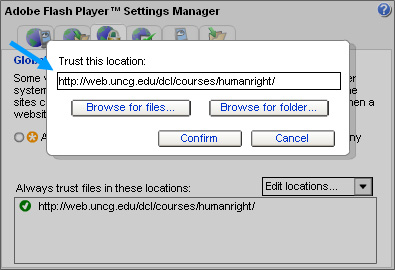
Now close out the settings window or tab and you are ready to begin!
Return to top